Knowledge Base
Categories: Microsoft Email Exchange
How To Access OWA Settings
This article explains how to access Outlook Web Access (OWA) settings after your Outlook mailbox has been set up. It outlines the steps to log in to OWA and navigate to the Options menu, where you can adjust various mailbox settings. The article also references separate guides for specific tasks, such as creating rules, changing themes, adding signatures, and managing block and allow lists.
How To Access OWA Settings
Outlook Web Access (OWA) is available once you have set up your Outlook Mailbox. Follow the steps below to get access to your OWA settings online.
- Log in to your Outlook Web Access.
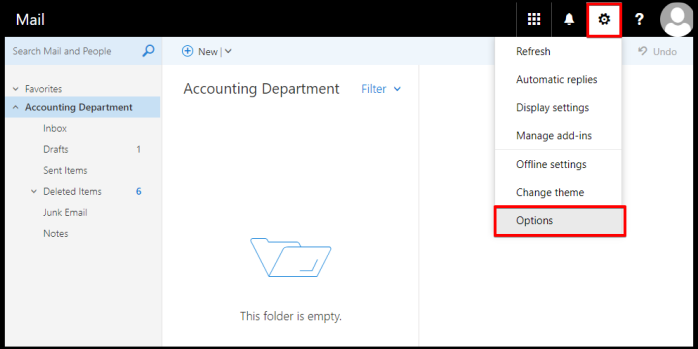
- Click on the Settings/Gear Icon and click on Options.
- Please visit the linked guides below for quick access to learn:
- Create Rule via OWA
- How to Change the OWA Theme
- How to Add Email Signatures in OWA
- How to Manage Block and Allow Lists in OWA
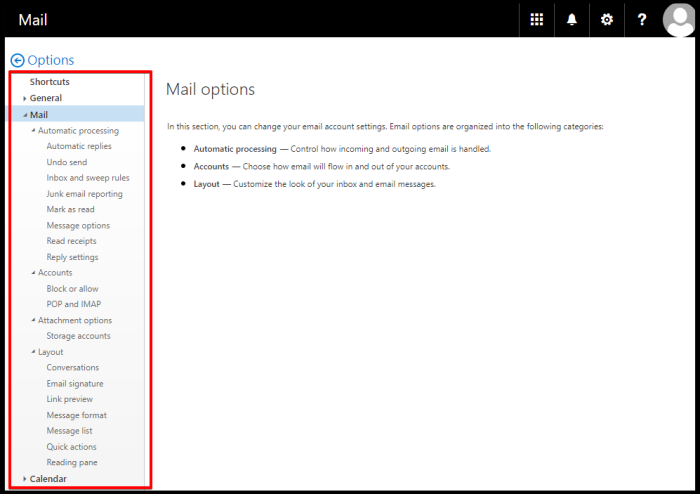
OWA Settings are not limited to the guides mentioned above, select the settings to configure on the left side pane of the window.
Did you find this article helpful?